DataGrid Cell Colors Example
Download the solution .
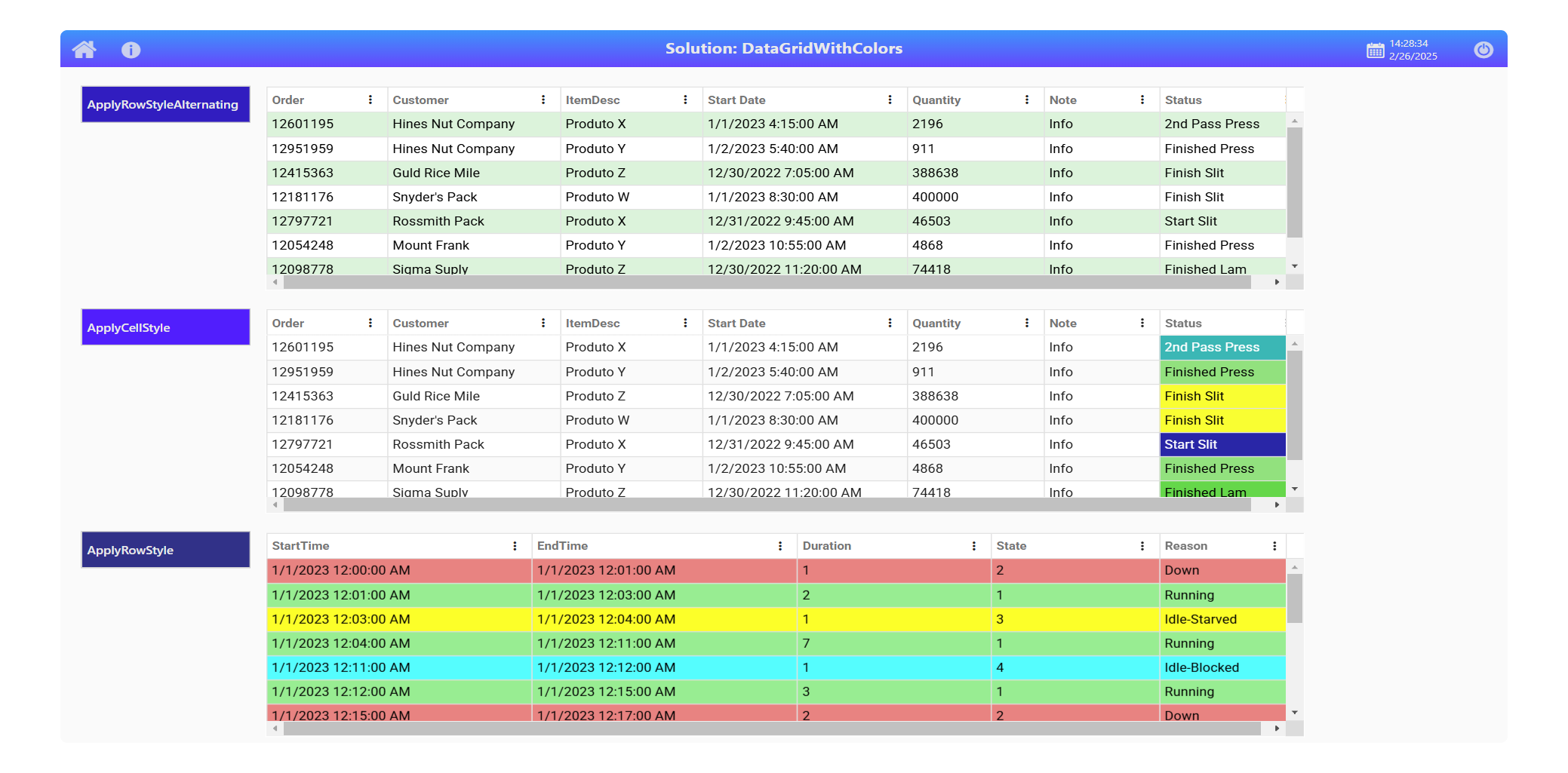
This solution example customizes colors on the DataGrid object.
Technical Information
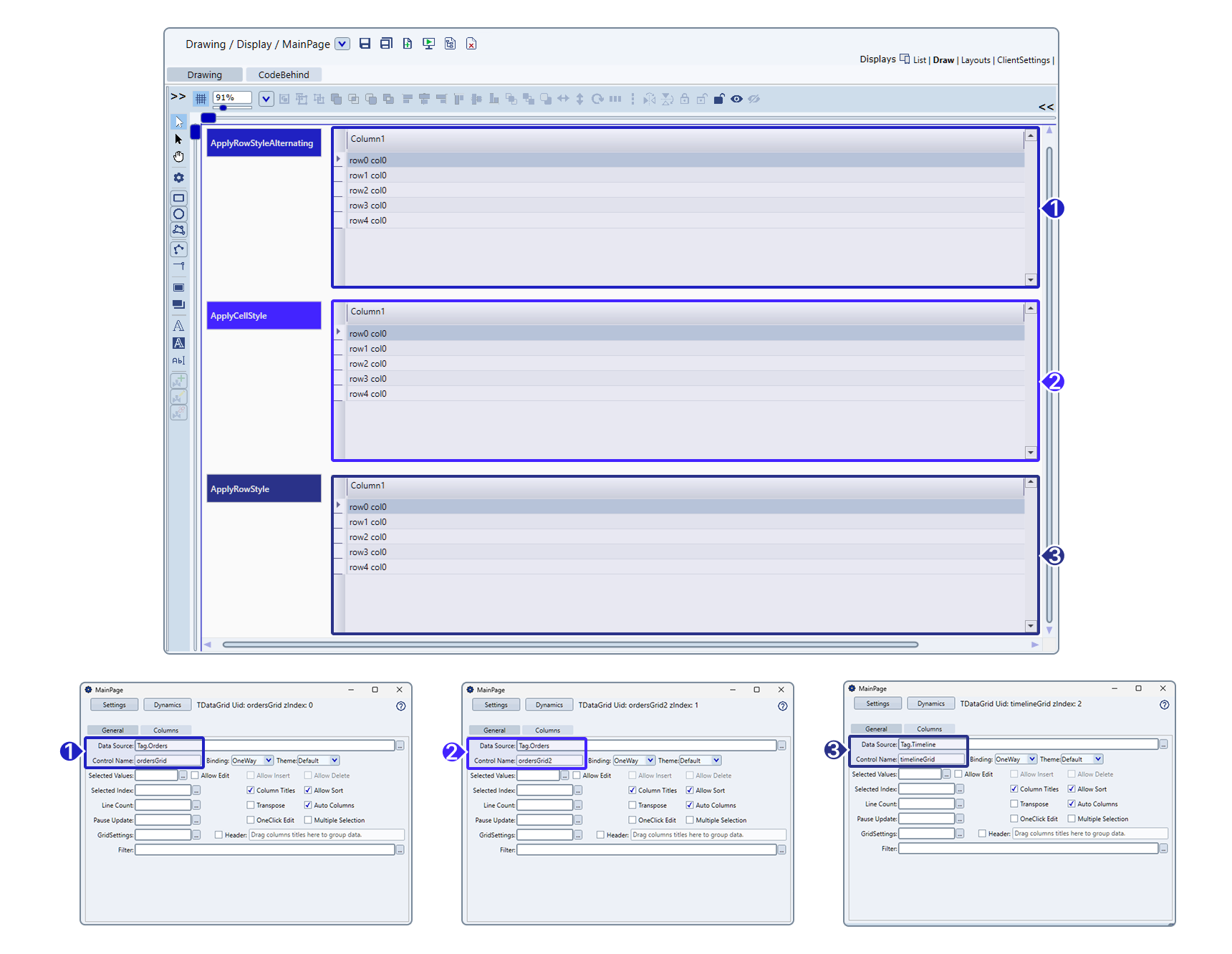
This example stores simulated data in a DataTable-type tag, which is populated in the code-behind. The data can also come from a database. Remember to configure the Data Source field in the DataGrid Settings dialog to ensure the data is displayed correctly. See the images below for an example of the configuration.
Apply Row Style Alternating
Alternating colors
private void ApplyRowStyleAlternating(DataRow row, Dictionary<string, object> attributes)
{
 // Retrieves the total number of rows in the table.
    int rowCount = row.Table.Rows.Count;
    // Retrieves the index of the current row in the table.
    int idx = row.Table.Rows.IndexOf(row);

 // Defines default text color as green and background color as black.
    string textColor = "#000000";
    string bgColor = "#FFFFFF";


    //Alternates colors for even and odd row indices.
    if (idx % 2 == 0) {
        textColor = "#000000";
        bgColor = "#DAF3DB";
    }

    // Assigns the foreground and background colors to the row attributes.
    attributes["Foreground"] = textColor;
    attributes["Background"] = bgColor;
}
Apply Cell Style
Cell colors based on values
private void ApplyCellStyle(string columnName, DataRow row, Dictionary<string, object> attributes)
{
    // Logs debug information when the method executes.
    @Info.Trace($"[DEBUG] || ApplyCellStyle || col: {columnName} || [1] ");

    // Exits the method if the column is not named "Status".
    if (!string.Equals(columnName, "Status"))
        return;

    // Logs debug information when the column matches "Status".
    @Info.Trace($"[DEBUG] || ApplyCellStyle || col: {columnName} || [2] ");

    // Retrieves the value of the "Status" column
    string status = row["Status"]?.ToString();
    if (string.IsNullOrEmpty(status))
        return;

    // Logs debug information about the retrieved value.
    @Info.Trace($"[DEBUG] || ApplyCellStyle || col: {columnName} || Row[col]: {row[columnName]} || [3] ");

    // Apply background and text colors based on status value using if-else
    if (status.Contains("2nd Pass Press")) {
        attributes["Foreground"] = "#FFFFFF";
        attributes["Background"] = "#00B9B6";
    } else if (status.Contains("Finished Press")) {
        attributes["Foreground"] = "#000000";
        attributes["Background"] = "#8BE27C";
    } else if (status.Contains("Finish Slit")) {
        attributes["Foreground"] = "#000000";
        attributes["Background"] = "#FCFD1A";
    } else if (status.Contains("Start Slit")) {
        attributes["Foreground"] = "#FFFFFF";
        attributes["Background"] = "#1929A9";
    } else if (status.Contains("Finished Lam")) {
        attributes["Foreground"] = "#000000";
        attributes["Background"] = "#57D845";
    } else if (status.Contains("2nd Pass Lam")) {
        attributes["Foreground"] = "#FFFFFF";
        attributes["Background"] = "#1A2B7E";
    }
}
Apply Row Style
Row colors based on values
private void ApplyRowStyle(DataRow row, Dictionary<string, object> attributes)
{
 string textColor = "#000000";
    string bgColor = "#FFFFFF";

 int state = TConvert.ToInt( row["State"]);
 switch(state)
 {
  case 1:
  default:
   bgColor = Colors.LightGreen.ToString().Replace("#FF","#");
   break;
  case 2:
   bgColor =  Colors.LightCoral.ToString().Replace("#FF","#");
   break;
  case 3:
   bgColor =  Colors.Yellow.ToString().Replace("#FF","#");
   break;
  case 4:
   bgColor =  Colors.Cyan.ToString().Replace("#FF","#");
   break;
 }

    // Assigns the foreground and background colors to the row attributes.
    attributes["Foreground"] = textColor;
    attributes["Background"] = bgColor;
}