Solution Lifecycle Reference
Information on how platform features support each phase of the solution lifecycle.
Reference → Solution Lifecycle | Tutorial | How-to Guide | Reference
Development Workflow
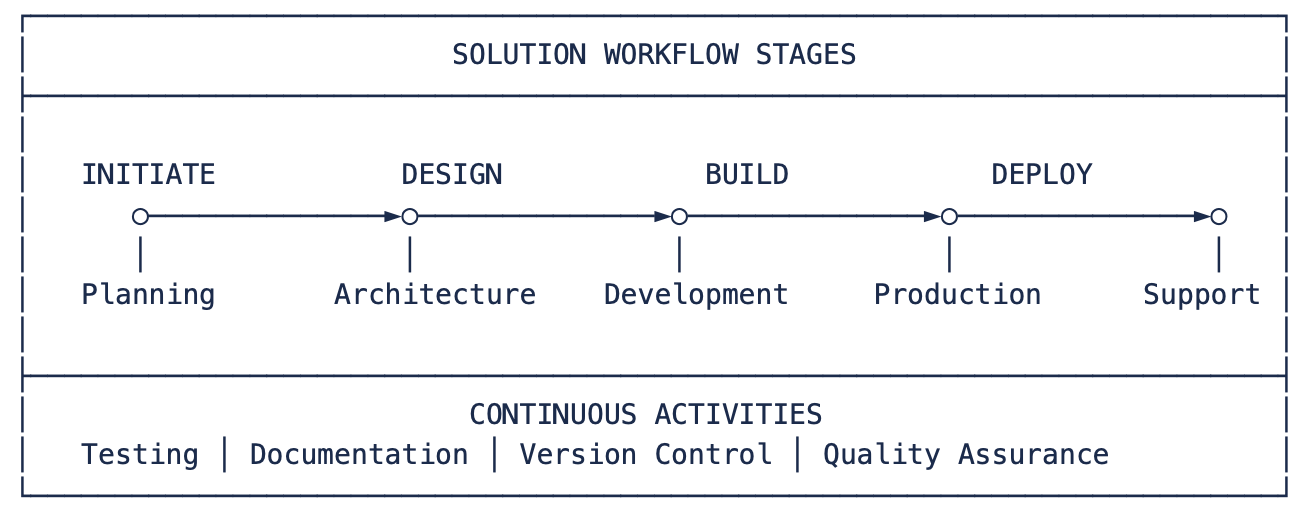
Solution Development Stages
| Initiate | Design | Build | Deploy | Support |
|---|---|---|---|---|
|
|
|
|
|
Platform UI Components
Three Essential Workspaces
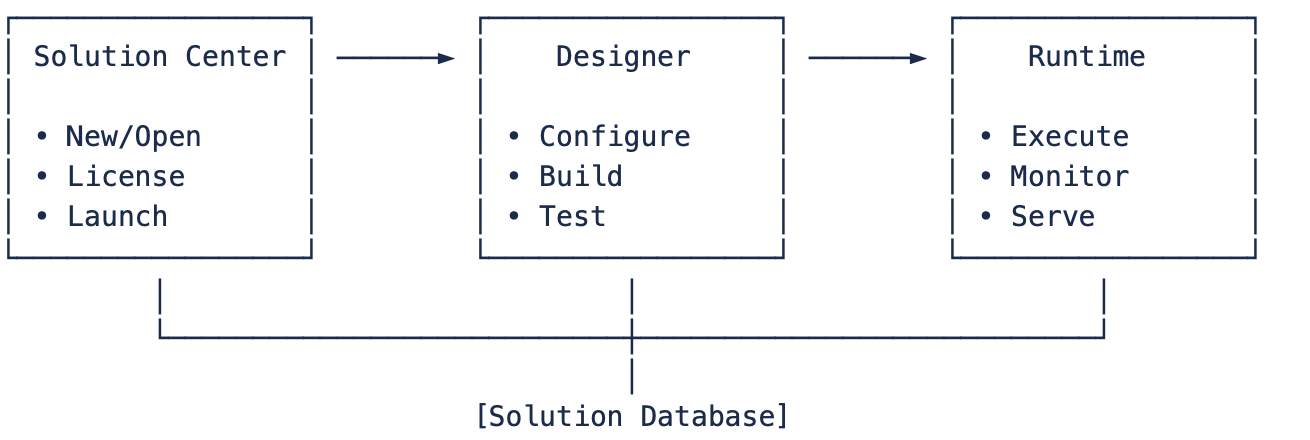
Platform Components Key Features
| UI Environment | Purpose | Key Functions | |
|---|---|---|---|
| Solution Center | Solution Management |
|
|
| Designer | Solution Configuration |
|
|
| Runtime | Solution Execution |
|
|
Platform Components Primary Use
The Solution Lifecycle uses these integrated ProView DS components:
| Solution Center | Solution management, templates, licensing | Project creation and management |
| Designer | Configuration IDE, diagnostics, Track Changes | Development and testing |
| Runtime | Execution profiles, Build & Publish, monitoring | Validation and production |
| DevOps & Version Control | Git integration, change tracking, audit trail | Change management and deployment |
Quick Reference Tables
Development Time Estimates
| Solution Size | Tags | Development Time (*) | Team Size |
|---|---|---|---|
| Small | <1,000 | 1-2 weeks | 1 person |
| Medium | 1,000-10,000 | 4-8 weeks | 2-3 people |
| Large | 10,000-50,000 | 3-6 months | 3-5 people |
| Enterprise | >50,000 | 6-12 months | 5+ people |
(*) About the Development Time estimates
Best Practices Checklist
| DO: | DON'T: |
|---|---|
|
|
 Start with UNS design
 Start with displays
 Project Planning with Four Pillars
Requirements Template by Pillar
Map requirements to ProView DS architecture:
| P1: UNS Foundation | Data points needed<br>Equipment hierarchy<br>Naming standards | Tags to create<br>Templates (UDTs) to design<br>Asset tree structure |
| P2: Process Modules | Field devices to connect<br>Alarm conditions<br>Historical data needs | Device channels & protocols<br>Alarm items & groups<br>Historian tables & retention |
| P3: Application Modules | Business logic required<br>Database integration<br>Reporting needs | Script tasks & classes<br>Dataset connections<br>Report templates |
| P4: Operator UI | User roles & screens<br>Client deployment<br>Mobile access | Display pages & navigation<br>Security configuration<br>Client types |
Stakeholder Mapping
| Operators | Runtime displays, alarm management | Client access |
| Engineers | Designer configuration, diagnostics | Engineering license |
| Managers | Dashboards, reports | View-only access |
| IT Support | Solution Center, Runtime monitoring | Admin access |
Testing with Platform Tools
UNS Integrity Verification
Verify foundation first:
- Designer Test Mode (F5)
- Validate tag structure and values
- Test templates and instances
- Verify asset tree navigation
- Property Watch
- Monitor real-time tag updates
- Check quality and timestamps
- Validate calculations
- Diagnostics Tools
- Runtime → Diagnostics for data inspection
- Cross-reference verification
- Module status monitoring
Execution Profile Testing
Test across environments using built-in profiles:
| Development | Initial testing | Local databases, full diagnostics, simulation |
| Validation | System testing | Test servers, limited clients, performance monitoring |
| Production | Live operation | Production databases, redundancy, optimized logging |
Configure in Runtime → Execution Profiles
Deployment Using Platform Features
Build & Publish System
- Development Build
- Runtime → Build & Publish
- Create .dbsln for testing
- Include debug information
- Production Publish
- Create read-only .dbrun file
- Version numbering
- Release notes
- Deployment Package
- Solution file
- Execution profile
- Client configurations
Backup & Recovery
Platform features for deployment safety:
- Solution Backup: Before any deployment
- Automatic Backups: Configurable schedule
- Version History: Through Git integration
- Rollback Capability: Previous .dbrun versions
Quality Gates Checkpoints
| Build Success | Solution compiles without errors | Runtime → Build & Publish |
| No Unused Objects | Clean configuration | Track Changes → Unused Objects |
| References Valid | All cross-references verified | Track Changes → Cross-Reference |
| Test Mode Pass | Runs without errors | Designer → Test Mode (F5) |
| Performance Check | Meets requirements | Runtime → System Monitor |
Change Management
Platform Change Tracking
| Configuration changes | Track Changes log | Track Changes → Recent Changes |
| User actions | Audit trail | Built into all modules |
| Version history | Git export | Solution → Export (if enabled) |
| Build versions | Build history | Runtime → Build & Publish |
Recommended Workflow
- Enable Git Integration
- Automatic JSON export
- Version control ready
- Diff-friendly format
- Use Track Changes
- Monitor all modifications
- Impact analysis before changes
- Audit trail for compliance
Best Practices Checklist
Leverage Platform Features
- Use Execution Profiles for environment management
- Enable Track Changes for audit trail
- Implement Git integration for version control
- Use Build & Publish for controlled deployments
- Monitor with built-in diagnostics
Avoid Common Pitfalls
- Skipping Test Mode validation
- Not using execution profiles
- Ignoring Track Changes warnings
- Deploying without Build & Publish
- Missing backup before deployment
Solution Lifecycle Links
Explanation - to understand concepts
→ Modules / Solution Lifecycle
Tutorials - to learn by doing
→ Tutorials / Solution Lifecycle Tutorials
How-to Guides - to accomplish specific tasks
→ How-to Guides / Solution Lifecycle How-to Guide
Reference - technical details
→ Technical Reference / Solution Lifecycle / Reference