Runtime Startup Reference
Configure and control all runtime options.
Reference → Solution → Runtime → UI → Startup | Build and Publish | Execution Profiles | Monitor
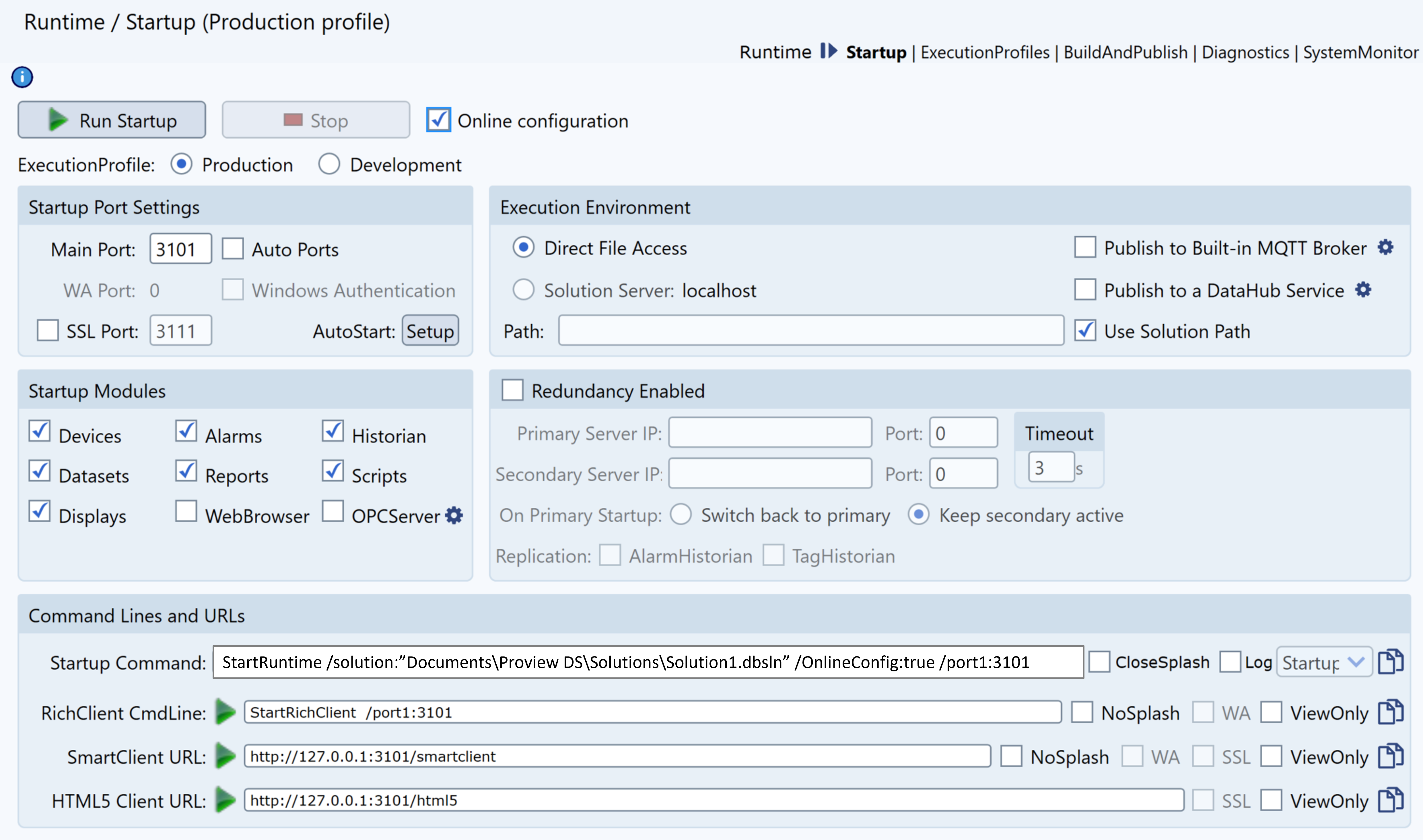
Runtime Startup (Reference): Configure and control solution execution, specify execution profiles, and customize connection settings for all runtime scenarios.
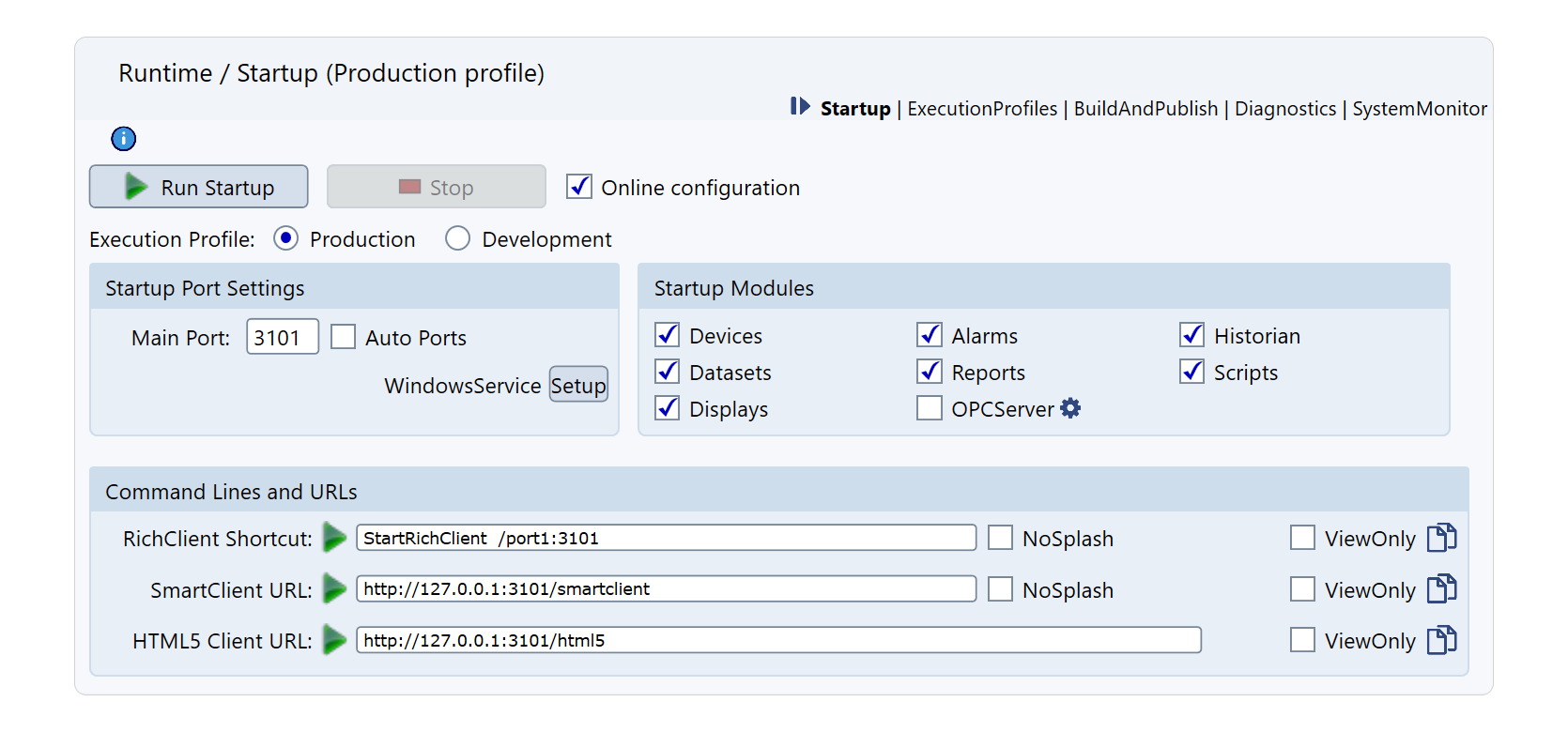
Access: Runtime → Startup
Main Commands
Execution Controls
| Run Startup | Starts the application | Button changes to Stop |
| Stop | Stops the application | Button changes to Run |
| Online Configuration | Apply changes in real-time | Must be connected to runtime |
Note: All changes must be saved before they appear in runtime when online configuration is enabled.
Execution Profiles
Select environment-specific configuration:
| Development | Debugging enabled, dev tools active | 3301 |
| Validation | Testing environment | 3201 |
| Production | Optimized for production | 3101 |
| Custom | User-defined settings | User-defined |
The Production profile uses main configuration without overrides. Other profiles apply configured replacements at startup.
Startup Port Settings
Configure network ports for application access:
| Main Port | Primary access port per profile | Profile-dependent |
| Auto Ports | Auto-select if main unavailable | Disabled |
| WA Port | Windows Authentication port | As configured |
| Windows Authentication | Require Windows auth only | Unchecked |
| SSL Port | HTTPS web access | 3111 |
| AutoStartup/Windows Service | Run at system startup | Disabled |
AutoStartup Behavior
Windows Platform:
- Configures as Windows Service
- Starts without user login
- Runs under system account
Multiplatform on Remote Devices:
- Configures in TWebServicesRunPrograms.json
- Starts with TWebServices
- Enables remote management
Execution Environment
Execution Path Settings
| Direct File Access | Local file access | Single-user development |
| Solution Server | TWebServices connection | Multi-user collaboration |
| Path/Use Solution Path | Override default path | Redundancy configuration |
DataHub Service
| Publish to DataHub | Share objects with remote DataHub |
| DataHub Settings | Configure connection parameters |
DataHub Settings:
- Alias: Solution identifier
- Primary/Secondary Host: Server addresses
- Port: TCP communication (default: 30001)
- AccessKey: Authentication
Built-in Broker Settings
| Publish to MQTT Broker | Make UNS visible to MQTT clients |
| TMQTT Broker Settings | Configure security and options |
Startup Modules
Select modules to activate at startup:
| Devices | Enable device communication | Required for field data |
| Alarms | Enable alarm processing | Required for notifications |
| Historian | Enable data logging | Required for trending |
| Datasets | Enable database access | Required for queries |
| Reports | Enable report generation | Required for documents |
| Scripts | Enable script execution | Required for logic |
| Displays | Launch WPF client locally | Opens TRichClient |
| OpenBrowser | Launch web client | Opens default browser |
| OPC Server | Enable OPC DA/UA server | External access |
Redundancy Settings
Configure high-availability environment:
| Primary Server IP/Port | Main server address | IP:Port |
| Secondary Server IP/Port | Backup server address | IP:Port |
| Timeout | Switchover delay | Seconds |
| On Primary Startup | Recovery behavior | Switch/Keep |
| Replication | Data to replicate | Alarm/Tag Historian |
Recovery Options
- Switch back to primary: Auto-return when available
- Keep secondary active: Manual switchback required
Command Lines and URLs
Startup Command Line
TStartup.exe /solution:"path\solution.dbsln" /profile:1 /OnlineConfig:true /port1:3301Parameters:
/solution:- Solution file path/profile:- 1=Dev, 2=Val, 3=Custom/OnlineConfig:- Enable online changes/wa- Windows Authentication/port1:- Override port
Client Access
| Rich Client | TRichClient.exe /port1:3101 | NoSplash, ViewOnly |
| Smart Client | http://IP:Port/smartclient | SSL available |
| HTML5 Client | http://IP:Port/html5 | SSL available |
Network Access Example
Accessing HTML5 from Other Devices:
- Server IP: 192.168.0.8
- Port: 3201
- URL:
http://192.168.0.8:3201/html5
Direct Monitor Access:
http://ServerIP:Port/html5/?Monitor=RuntimeStartup Procedure
Step-by-Step Process
- Launching TStartup.exe
- Loads the Solution
- Reads Solution Configuration
- Parses Command Line Parameters
- Activates Main Process TServer.exe
- Starting Real-Time Database
- TServer.exe loads objects into memory
- Establishes communication service
- Modules Startup
- Each module reads configuration
- Establishes connection with main process
- Applying Execution Profiles
- Development: Local SQLite database
- Production: SQL server connection
- Designer Connection
- Automatic connection for monitoring
- Client Display Access
- Remote computers can connect
- Online Changes
- Apply without runtime disruption
Platform-Specific Features
Windows-Only Features:
- Windows Authentication
- Windows Service configuration
- OPC Classic support
- Specific security features