Display Settings Reference
Configure general display properties.
How-to Guides → Pillars → Operator → Displays → Workspace → Dashboards | Settings | Properties | Tags
Display Settings (Reference) configure display-level properties including mode (Page/Popup/Dialog), resize behavior, borders, and placement options within the Drawing workspace.
Display Settings control:
- Display mode behavior
- Window properties
- Resize handling
- Border styles
- Dialog buttons
- Placement options
Access via Properties Sidebar → Display Settings when in Drawing workspace.
Display Modes
| Page | Replaces current display | Main navigation screens |
| Popup | Non-modal overlay, auto-closes on navigation | Information panels |
| Dialog | Modal overlay, blocks interaction | User confirmations |
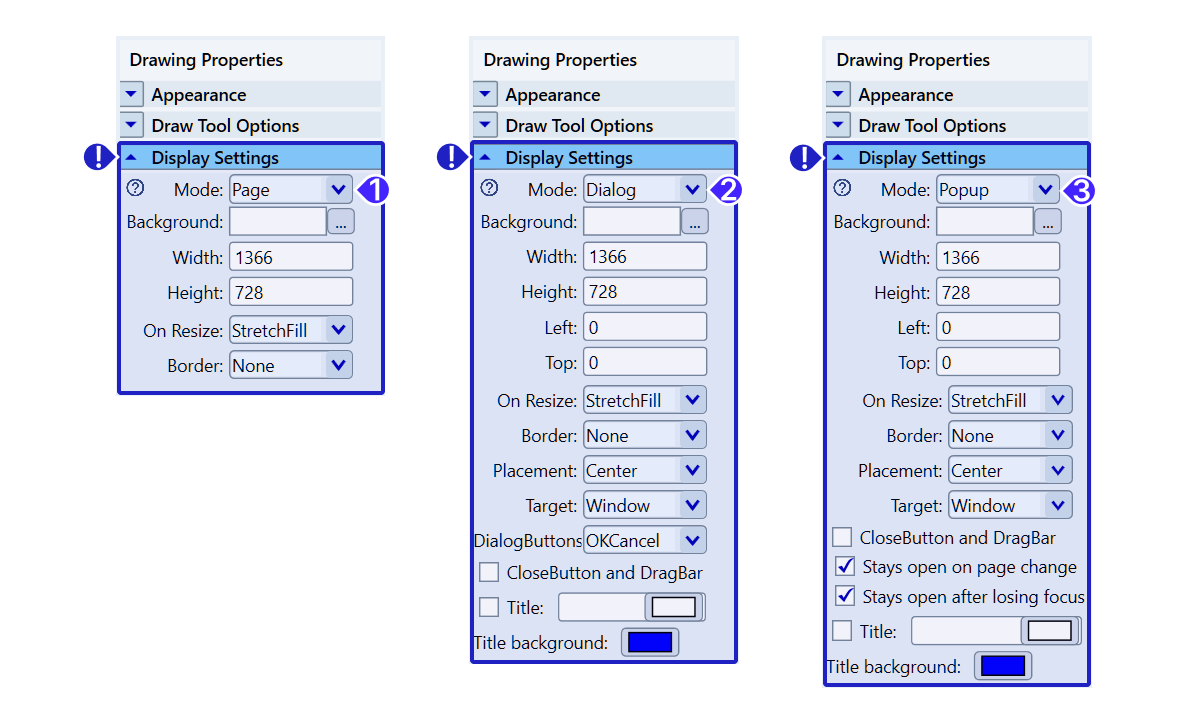
Page: Closes the last active page listed on the Displays → Layouts page when a new page is opened.
Popup: Overlays the current display on top of other displays without closing them. Automatically closes when a new page is opened.
Dialog: Opens a modal dialog that disables all underlying controls until the dialog is closed, requiring user interaction to proceed.
Resize Behavior
| StretchFill | Fill entire space | Not preserved |
| StretchUniform | Scale uniformly | Preserved |
| Responsive | Dynamic layout adjustment | Element-specific |
| NoAction | Fixed size | Original maintained |
| ResizeChildren | Proportional scaling | All elements scale |
Responsive Layout
When using Responsive:
- Check layout coordinates to enable
- Checked properties adjust during resize
- Maintains relative positioning
Dialog Configuration
Button Sets
- OK - Single confirmation
- OKCancel - Confirm or cancel
- YesNo - Binary choice
- YesNoCancel - Choice with escape
- None - Information only
Additional Options
- CloseButton - Enable/disable close
- DragBar - Allow window dragging
- Stays open on page change - Persist navigation
- Stays open after losing focus - Keep visible
- Title - Display title text
- Title background - Title bar color